Close Menu
  • Home
  • Sports News
  • Tennis
  • Football
  • Esports & Gaming
  • Basketball
  • Golf
  • Boxing & MMA
Top Post

Tommy Fury vs. Eddie Hall Results: Misfits Boxing

June 13, 2026

Ticket to the big stage: Hanwha Life Esports locks in first-ever MSI spot over T1

June 13, 2026

Too little too late: Angels 4, Rays 3

June 13, 2026
Facebook X (Twitter) Instagram
X (Twitter) Instagram Bluesky Facebook YouTube
  • Home
  • Sports News
  • Tennis
  • Football
  • Esports & Gaming
  • Basketball
  • Golf
  • Boxing & MMA
tv1la.comtv1la.com
Home»Esports & Gaming»Here’s How To Solve The Thermal Scope Bug In Battlefield 6
Esports & Gaming

Here’s How To Solve The Thermal Scope Bug In Battlefield 6

tv1la.comBy tv1la.comJune 10, 2026No Comments
Twitter Bluesky Facebook
Here's How To Solve The Thermal Scope Bug In Battlefield 6
Share
Twitter Bluesky Facebook

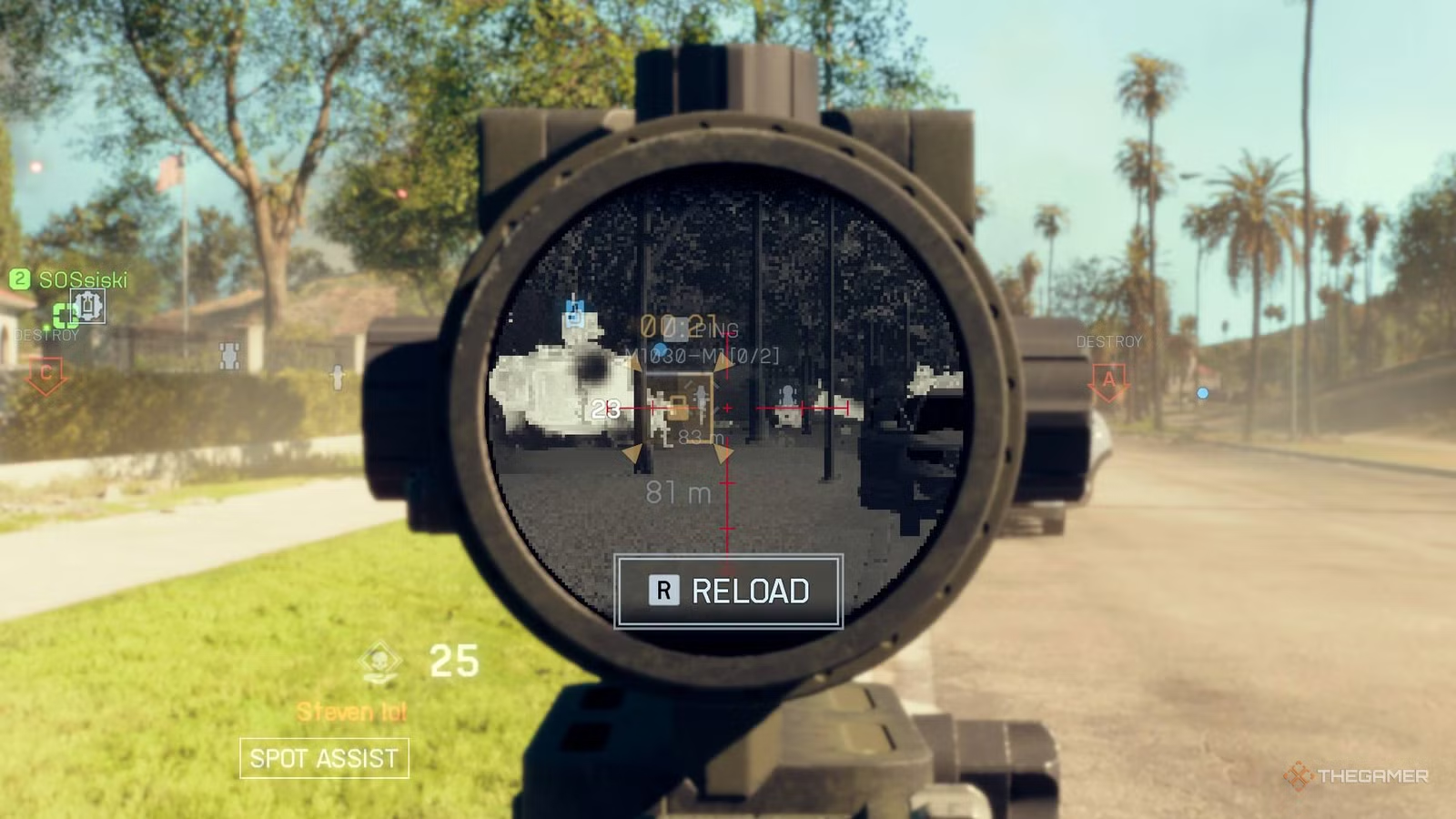
Battlefield 6 has a number of bugs that have been present since the game’s launch and yet remained unfixed. One of these is the thermal scope bug, which distorts your screen whenever using a thermal scope, either on your weapon or via a gadget like the drone or laser designator.

This is an annoying bug because it distorts the visuals and makes enemy players harder to see. After a bit of testing, I found two fixes for the bug: one that provides a temporary workaround during a match, and one that is a little more permanent to prevent the issue altogether.

How To Permanently Fix The Thermal Scope Bug

The easiest way to fix the bug is to disable DLSS in the menu.

You can do this by:

  • Navigating to the settings menu
  • Going to graphics menu
  • Go into advanced settings
  • Turn DLSS off in the “Upscaling Technique” menu.

In my testing, this completely removed the thermal scope distortion that was caused by using a thermal scope. The fuzziness of the screen is gone, even after playing through several matches. This might make your game look a little different, but I’ve found the difference to be quite minimal.

I would double-check that your game keeps the DLSS turned off whenever you restart the game. Sometimes the Nvidia settings may cause the game to turn it back on.

How To Temporarily Fix The Bug

If you experienced the bug in-game multiple times (like I had), a quick way to clear the visual distortion is to just Alt + Tab out of the game and back in again. This returns the visuals to normal.

I also had some success with verifying the files via Steam as this is a known fix for little bugs like this, particularly after a chunky update like Battlefield 6 receives regularly. Until DICE releases an official fix, these are currently the most effective workarounds.

A player unlocking all Season 3 Hardware in Battlefield 6.

Battlefield 6: All New Hardware In Season 3

Here is how to unlock all of the Hardware in Season 3 of Battlefield 6.

Battlefield Bug Heres Scope solve Thermal
Share. Facebook LinkedIn Bluesky
tv1la.com
  • Website

Related Posts

Ticket to the big stage: Hanwha Life Esports locks in first-ever MSI spot over T1

June 13, 2026

Barcelona threaten legal action against Florentino Perez after Real Madrid chief’s ‘slanderous’ claim

June 13, 2026

Kwik Trip is selling Mountain Dew donuts and fans are already hunting them down

June 12, 2026

I’m Convinced That Upcoming Cosy Game Vivarium Has A Secret Dark Side

June 12, 2026
Add A Comment
Leave A Reply Cancel Reply

Latest Post

Tommy Fury vs. Eddie Hall Results: Misfits Boxing

June 13, 2026

Ticket to the big stage: Hanwha Life Esports locks in first-ever MSI spot over T1

June 13, 2026

Too little too late: Angels 4, Rays 3

June 13, 2026

Alexander Zverev reveals when he plans to retire from tennis after finally winning a Grand Slam

June 13, 2026
Trending

How to watch League One play-off final: Streams and TV Info

By tv1la.com

Pre-Match Poser no.28: Can you answer this elite-level football quiz question?

By tv1la.com

Harry Kane hattrick – Bayern Munich secure first double since 2020

By tv1la.com
X (Twitter) Instagram Bluesky Facebook YouTube
  • About Us
  • Contact Us
  • Privacy Policy
  • Terms and Conditions
tv1la All Rights Reserved 2026

Type above and press Enter to search. Press Esc to cancel.